Tickets at your fingertips
Buy and activate tickets right from your phone. It’s the perfect way to travel quickly and conveniently.
Ideal for occasional riders, visitors, or groups! Easily buy and use PRESTO E-Tickets right on your phone. Available on participating agencies.
3
Buy an E-Ticket through your PRESTO account. You can also buy a physical ticket without an account.
4
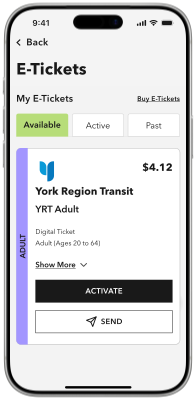
Tap "Activate" before boarding, then scan the E-Ticket on a PRESTO device using the barcode reader.
Buy and use your PRESTO E-Tickets instantly, right on your phone.
Pay the same fare you would if you used a PRESTO card.
Your E-Tickets are on your phone, instead of in your wallet.
2-hour free transfer window for the transit agency you bought the E-Ticket for.
Buy & activate up to 20 E-Tickets at a time and travel as a group.
Buy & send E-Tickets to someone else, such as family or friends, through the PRESTO app.
1
Sign in to your PRESTO account on the PRESTO app or website.
2
Select "E-Tickets" in the Settings menu.
3
Select "Buy E-Tickets" in the upper right corner.
4
Select the transit agency and checkout with your e-tickets.
5
Your e-tickets will now appear under the "Available" tab.
6
When you’re ready to take transit, select the e-ticket you wish to use and tap "Activate". Follow the steps and you’re ready to go.
Buy and activate tickets right from your phone. It’s the perfect way to travel quickly and conveniently.